

You must have Drillers Rights to change the hole and bit depths.
-
Click the Set hole/Bit Depth button
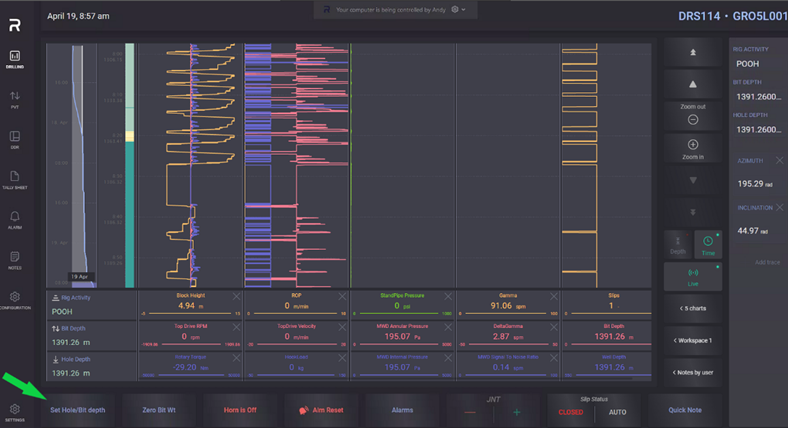
2. Set Hole/Bit depth window will appear.
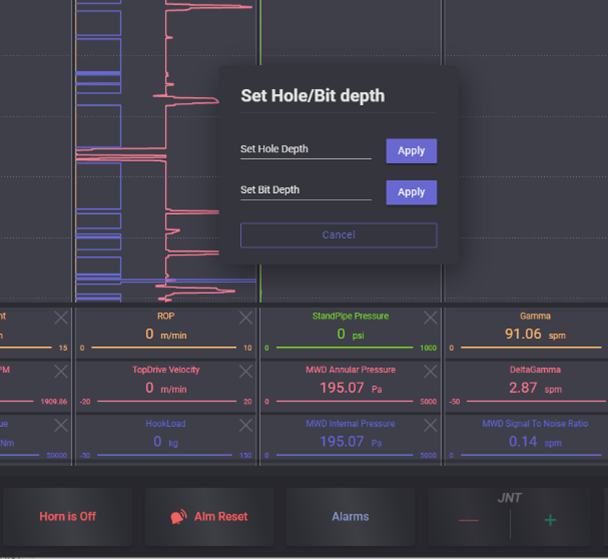
3. To set the hole depth, click into the top row and enter the new hole depth. Press Apply to send the new hole depth.
IMPORTANT: Hole Depth value must be greater than Bit Depth value. The EDR will not accept a new hole depth if it is shallower than the current bit depth.
4. To set the Bit depth, put the cursor into the bottom row and enter the new Bit depth. Press Apply to send the new bit depth.
IMPORTANT: Bit Depth value must be smaller than the Hole Depth value. The EDR will not accept a new bit depth if it is deeper than the current bit depth.
5. Click anywhere on the screen outside the modal window to exit from the Set Hole/Bit Depth menu.